Table of contents!
- Artwork:
Exporting art
Importing art
Using PSD
Importing a PSD to Ibis - Brushes, colors and configuration:
Exporting
Importing
Tutorial on how to export your drawings, brushes and color palettes on IbisPaint X! (UPDATED - 2026)
This actualized version of the tutorial uses a much better way to export and import IPV files (Ibis Paint
artwork file).
Alternatively you can save your art as a PSD (Adobe Photoshop Document) which I'll show later on!
First of all, make sure to name your drawings. None of the art import files have image previews, so naming them helps to recognize them!! helps to recognize them!!
Exporting art
Go to the preview of the drawing you wanna export and select the share icon (on PC it looks like an arrow:  ) and
select "Ibis Paint Artwork (IPV)", then you will be prompted with an option to where you'd want the file to be
exported. Now there's an option to save it in your phone's Download folder! But you can still save it to your
preferred cloud storage.
) and
select "Ibis Paint Artwork (IPV)", then you will be prompted with an option to where you'd want the file to be
exported. Now there's an option to save it in your phone's Download folder! But you can still save it to your
preferred cloud storage.

On PC, it's the same steps, but there's a chance it will not clearly show you where to share it. If that's the case, you can copy the file and paste it anywhere you want!
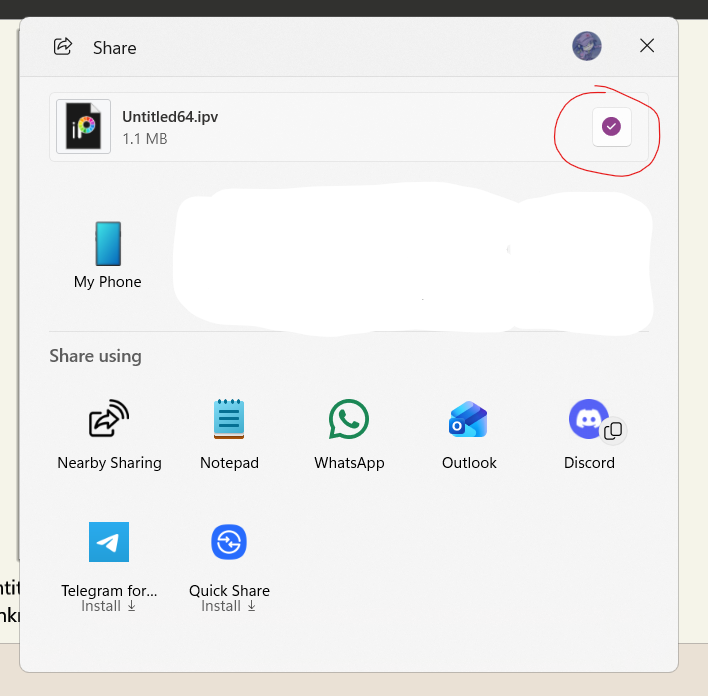
Importing art
Go to your file manager and go to the folder is most likely to be (Downloads or another folder if you already organized these files), tap it and an "open with" menu app will appear, select Ibis paint, and it will automatically appear in your Ibis gallery!
FOR PHONES: If your file manager doesn't show any "open with" menu use an alternative like Files by google, Z-archiver or File Manager +, the menu will appear yet the Ibis Paint icon will maybe be at the end. This is more specific to samsung devices, I'm not sure about others!

On PC clicking the file will be enough but it will open the canvas automatically :)
Using PSD
PSD is a more generic file type for Ibis, it will let you open it on other programs like Photoshop, Gimp, Krita, Clip Studio and Procreate. BUT things like layer types (adjustment/fx, blending mode, screen tone and text) will show as generic layers and neither time-lapse nor drawing time will be available.
To save your art as a PSD, go to the preview of your drawing and open the save image menu (the three dots⫶), a menu will appear so select PSD as the file type WITH "Preserve Layers" toggled ON and finally hit "ok".
SAVE THE FILE ONLY IN PREVIEW. If you are saving your drawing while in the canvas the "Preserve Layers" option will NOT appear and when you open it will just a single layer.

The file will be saved in the usual "Pictures" folder in your phone's gallery! Then you can move it or save it anywhere else.
Importing a PSD to Ibis Paint:
Open your file manager and tap/select your PSD file. An "open with" menu will appear, select Ibis Paint and when you open the Ibis gallery, this pop-up will appear:

Select "Yes" and you'll have the artwork in the app!
on PC it will just open the canvas!
Brushes, color palettes and configuration:
Go to the apps' main menu and tap on the gear icon that's in the corner, a menu will appear, and you'll scroll down to the bottom, on the "Other" category, tap on "Backup Settings":

Same as the IPV and PSD files it it will ask you where do you wanna save it. This will make an "ipcfg" file (which i suppose it means ibis paint configuration). And there you have your backup!
Importing configuration back:
Same as the drawings, tap/click on the file in your file manager, this time the app will open and show this menu:

Here toggle on whatever you want back! I recommend tapping on "Clear existing color palettes" if you are importing these so it doesn't mix up with the default ones in the app. Then you click the check symbol and done!
It may be tedious but it helps to save cloud space and it's always good to have an offline backup. I've been doing this for years and I really really wanted to share this tutorial... now actualized :)